



|
BoxCast Streaming BoxCast Flow BoxCast Spark Broadcaster App BoxCast Producer Third-Party Encoders |

|
BoxCast RemoteMix Compatible Mixers Mixing Station Works with BoxCast RemoteMix |

|
BoxCast OTT Apps |
|
|
BoxCast Streaming BoxCast Flow BoxCast Spark Broadcaster App BoxCast Producer Third-Party Encoders |
|
|
BoxCast RemoteMix Compatible Mixers Mixing Station Works with BoxCast RemoteMix |
|
|
BoxCast OTT Apps |
Alright, so you're diving deep into audio cables. Maybe you're about to buy a few. Maybe you're just trying to make sense of the large plastic tub of tangled cords behind your soundboard.
After over a decade working in tech, I've found that when people research technical gear, newbies and experts both tend to learn something new. So a seasoned audio engineer will know most of what's here, but probably not all of it, so it's still worth the read.
So we'll start at the very beginning (Julie Andrews would approve) and get more technical as we go. By the end, even the most experienced engineers should have something fresh to think about.
XLR vs TRS vs TS: The Short Answer
XLR, TRS, and TS Cables Explained: The Basics
XLR vs TRS vs TS: Strengths and Weaknesses
When to Use XLR, TRS, or TS: Real-World Setups
How Much Do XLR, TRS, and TS Cables Cost?
XLR, TRS, or TS: Which Cable is Best?
Why Audio Cables Matter for Your Live Stream
Final Thoughts
If you've only got 30 seconds before you have to sign off, read this next part.
XLR, TRS, and TS are three of the most common audio connectors. XLR and TRS can carry balanced audio, which cancels out noise and handles long cable runs. TS is unbalanced, so it's best kept short.
-- Want the full story on why balanced matters? Our guide to balanced vs. unbalanced audio is the deep dive. --
In most church and school setups, XLR handles microphones and long runs. TRS handles balanced connections between nearby gear, plus headphones. TS also commonly handles instruments like guitars and keyboards.
| XLR | TRS | TS | |
|---|---|---|---|
| Balanced? | Yes | Yes, when both devices are balanced (it also carries unbalanced stereo, like headphones) | No |
| What it looks like | Round connector with three pins or three holes and a locking latch | 1/4-inch plug with two insulating rings near the tip | 1/4-inch plug with one insulating ring |
| Locks in place? | Yes | No | No |
| Carries phantom power? | Yes | Rarely | No |
| Comfortable run length | 100 feet and up | 100 feet and up, when balanced | About 20 feet or less |
| Where it belongs | Mics, DI boxes, stage snakes, mixer to speakers | Mixer or audio interface to powered speakers, monitors, or your encoder; headphones | Guitars, basses, and keyboards into amps, pedals, or DI boxes |
Let's start with what most people want to know before they spend a dime, plus a few questions they don't think to ask.
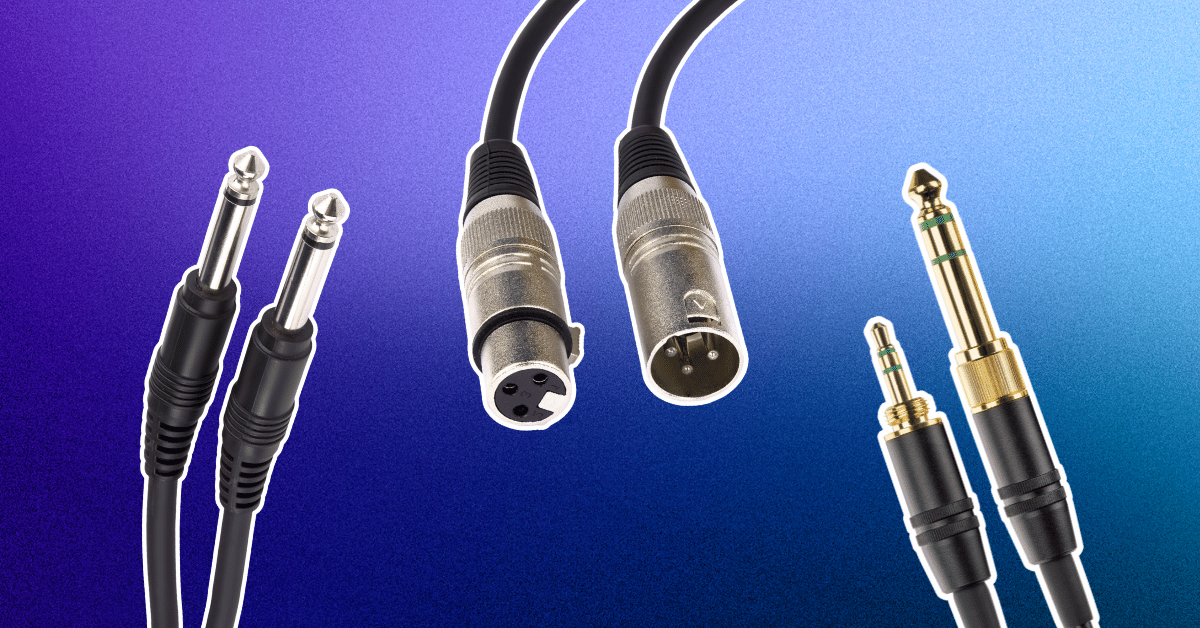
XLR is the easy one. It's the round connector with three pins (male) or three holes (female), plus a little latch that clicks when you plug it in.
TRS and TS are the tricky pair, because both use the same 1/4-inch plug. Audio folks often just call them quarter-inch cables. To tell them apart, look at the tip and count the insulating rings.
One ring means TS, short for tip-sleeve. Two rings means TRS, or tip-ring-sleeve. A quick way to remember the difference is TRS has one more letter than TS, and it also has one more ring on the tip.
Diving deeper, these names describe the metal contacts on the plug, and that extra ring is what lets TRS carry a balanced or stereo signal. You'll also see both in a smaller 3.5mm size, like the headphone jack on a laptop.
Not in a way you'd notice. A typical mic cable and a typical guitar cable are both roughly as thick as a pencil.
The difference is inside. XLR and TRS cables carry two signal wires plus a shield. TS cables carry one signal wire, and the shield doubles as the return path for the signal.
So a thicker cable isn't automatically a balanced one. The place where thickness really matters is speaker cable, which we'll get to in a minute.
Balanced cables can go a long way. Shure's Tim Vear puts it at 1,000 feet or more for a low-impedance mic on a balanced line, with no loss in quality. Your sanctuary or gymnasium probably isn't that big.
TS is a different story. High-impedance sources like guitar pickups start losing high end past about 20 feet, and unbalanced cables pick up more hum the longer they get.
TRS splits the difference. When it's carrying a balanced signal, it can run as far as XLR. When it's carrying stereo or an unbalanced signal, treat it like TS and keep it short.
XLR does, and the list is longer than you'd think. The XLR family shows up on DMX lighting control, AES3 digital audio, and production intercom headsets. A four-pin version is the standard DC power input on a lot of pro video cameras.
TRS and TS stick mostly to audio, but they get around. TRS handles stereo headphones, insert cables (one plug that sends audio out and brings it back), and expression pedals. TS handles instruments, simple on/off footswitches, and speakers when it's built as a speaker cable.
Just because a cable fits doesn't mean it's the right cable, though. We'll cover the risky swaps in the next section.
XLR can, through phantom power. Your mixer sends DC voltage, usually 48 volts, down the same two wires that carry the audio. Condenser mics and active DI boxes run on it.
It's called phantom because it rides along invisibly with the signal. A properly wired dynamic mic, like the classic Shure SM58, isn't bothered by it.
TRS rarely carries phantom power, and TS never does. If something on the end of a 1/4-inch cable needs power, it usually brings its own battery or adapter.
XLR connects microphones and DI boxes to mixers and stage boxes. It also runs from mixer outputs to powered speakers and amps.
TRS usually connects nearby gear at line level: a mixer or audio interface to powered speakers, studio monitors, or a streaming encoder. It's also the plug on most studio headphones.
TS connects guitars, basses, and keyboards to amps, pedals, and DI boxes. It also shows up on older or budget gear with unbalanced outputs.
XLR is the only one of the three that locks in place and reliably carries phantom power. That's a big reason nearly every professional microphone uses it.
TRS is the multitasker. The same plug can carry balanced mono, unbalanced stereo, or a send and return, depending on the jack it goes into. That flexibility is great, right up until you grab the wrong one.
TS doesn't have a unique trick so much as a unique job. It's been the standard cable for electric instruments for decades.
Older than you'd guess. The 1/4-inch plug descends from telephone switchboards dating back to 1877, which makes it nearly 150 years old. That's why it's still called a phone plug, and why phone lines still use the terms tip and ring. Even the word jack reportedly started there, when an 1879 switchboard receptacle got nicknamed a jack-knife for looking like a folding pocket knife.
XLR is the younger one. It started as Cannon Electric's X series, picked up a latch (the L) by 1950, and got a rubber insert (the R) by 1955.
As for going away, not anytime soon. Digital snakes and network audio like Dante are replacing many long analog runs. But the mic still plugs into the stage box with an XLR, and the guitar still plugs in with a TS, so the last few feet of your signal chain still look a lot like the 1950s.
Every cable on this list is the right answer somewhere and the wrong answer somewhere else. Here's where each one earns its keep, and where it lets you down.
XLR's biggest strength is that it's balanced, so it shrugs off hum over long runs. It locks in place, so a tug on the cable won't pull the mic out mid-sermon. And it's the cable that carries phantom power for condenser mics.
It's even polite about being plugged in. XLR connectors are designed so the ground connects before the signal pins do, which is why you can usually plug one in without a loud pop.
Where XLR struggles is size. The connectors are bulky, so you won't find them on a lot of compact gear like encoders, small video switchers, and laptops.
It also hides an easy mistake. The same XLR connector carries both mic-level and line-level signals, and those are very different strengths. Plug a line-level output into a mic input and you'll get distortion, even though everything fits.
The most common failure point is the connector itself, where cables get bent, yanked, and stepped on. Cheap cables with flimsy strain relief tend to go first.
TRS gives you balanced audio in a much smaller plug, which is why you'll find it on so many audio interfaces, studio monitors, and even some streaming encoders. It's also the most versatile of the three. The same plug can carry balanced mono, stereo headphones, or an insert send and return.
That versatility is also its biggest weakness. A TRS cable can't tell you what it's carrying, because the jacks on each end decide that.
TRS doesn't lock, so it can get bumped loose. And like any 1/4-inch plug, it pops as you plug it in, because the tip brushes past the other contacts on the way in. Mute the channel or turn down the speaker first.
One more quiet risk: mixing TRS and TS gear usually still works, but it unbalances the connection. You lose the noise rejection, and nothing warns you that it happened.

Remember the opening of Back to the Future, when Marty McFly plugs his guitar into Doc's giant amp? That's a TS cable. Plugging in wasn't the problem there. The volume knob was.
TS is simple, inexpensive, and easy to find anywhere. It's the cable your guitarist already owns three of, and it's the right tool for connecting instruments to amps, pedals, and DI boxes.
The weakness is that TS is unbalanced, so it can't cancel noise. Because the shield doubles as part of the signal path, a long TS run can act like an antenna for hum and buzz. Keep runs short, and cross power cables at right angles instead of running alongside them.
Unbalanced connections are also more prone to ground loops, that steady hum you get when gear on different power circuits gets tied together through a cable's shield. A DI box with a ground lift switch is the usual fix. If the buzz is already showing up on your stream, our guide to fixing the buzzing noise on your live stream walks through the usual suspects.
Here's where seasoned engineers might find something new, or at least something to forward to the volunteer who keeps doing it.
Let's put some faces behind these cables.
Picture the volunteer at the back of a 400-seat sanctuary on a Sunday morning. There are 12 mics on stage, and the mixer sits 80 feet away. That's XLR territory. So is the AV coordinator wiring up graduation in the gym, and the crew running announcer mics at Friday night football.
XLR lives anywhere the mixer is far from the action: sanctuaries, auditoriums, gyms, fields, and stages.
If that's you, XLR is your everyday cable. Buy a few more than you think you need, because every once in a while somebody will probably borrow one. And if you're building out a volunteer sound team, our guide to outstanding church audio with volunteers is worth a read.
Now picture the media booth. The producer is working in a tight space with an audio interface, a pair of studio monitors, a computer, and the streaming encoder, all within arm's reach. Or it's the worship leader recording rough demos at home, or the teacher turning a classroom into a podcast studio.
That's TRS country: short, balanced, line-level connections between gear that sits close together.
If that's you, TRS cables (plus a few XLR-to-TRS cables) will cover most of your connections.
TS belongs to the musicians. Think of the guitarist and bass player in a band, the keyboard player, or even the student rehearsing their instrument after school.
It lives on stages, in rehearsal rooms, and on pedalboards. If that's you, keep your TS runs short and let a DI box handle the long trip to the mixer.
XLR and TRS overlap the most. Both carry balanced line-level audio, so a mixer can feed powered speakers with either one, and plenty of speakers have combo jacks that take both.
TRS and TS overlap physically, since they share the same jack. That's exactly why they get mixed up.
Then there are jobs where only one cable makes sense. Microphones and phantom power belong to XLR. Electric guitars and basses start on TS. Stereo headphones and insert cables need TRS.
At BoxCast, we work with a lot of churches, so we'll use this use case in our practical example here. In most rooms, these folks will use all three cables in a single Sunday. Here's how the signal usually travels:
Good news for your budget committee: the cable type barely moves the price.
XLR tends to cost a bit more than TRS at the same length and quality, mostly because the connectors cost more. TS usually lands a little cheaper still, since it's the simplest of the three. The bigger cost difference between balanced and unbalanced is the gear on each end, not the cable in the middle.
What really moves the price is build quality. At the time of writing, here's roughly how the tiers shake out:
So where should you spend? On anything that gets coiled, stepped on, and unplugged every week. A $15 cable that crackles during the sermon ends up costing more than it saved. Short patch cables that live in a rack and never move are a fine place to save.
Cables usually come from one of three places. Amazon and big-box stores win on convenience and budget options. Specialty retailers like Sweetwater, Full Compass, and B&H carry a deeper bench of pro brands and have staff who can answer questions. And local music stores like Guitar Center are handy when you need a cable before Sunday.
If you're wiring a building permanently, that's usually a job for an AV integrator, who'll pull bulk cable through the walls and terminate it on site. Some engineers skip the store entirely and build their own from bulk cable and Neutrik connectors, which is cheaper per foot and a great excuse to learn to solder.
If you were hoping for one cable to rule them all, I've got mixed news.
There's no single winner, because these cables aren't really competing. Each one was built for a different job. A guitar doesn't want an XLR, and a condenser mic can't get phantom power through a TS.
That said, if you made me pick one cable to standardize on for a church or school, it'd be XLR. It handles mics, long runs, phantom power, and most mixer outputs, and it's the hardest of the three to plug into the wrong thing.
From there, add a handful of TRS cables for the gear near your mixer, leave TS to the musicians, and keep a couple of DI boxes in the closet. Then label everything, because Sunday morning is a terrible time to play guess-the-cable.
The three in this post get compared most often, but any audio pro would want a few others on your radar:
Adapters are the duct tape of audio: incredibly handy, and not a substitute for doing it right.
The key thing to know is that an adapter changes the plug, not the signal. XLR to TRS is the friendly one, since it stays balanced as long as both ends are balanced. XLR to RCA turns a balanced signal into an unbalanced one, so you lose the noise rejection on that run.
Adapters also don't fix level mismatches. Pro gear typically runs at +4 dBu and consumer gear at -10 dBV, and that roughly 12 dB gap can mean distortion going one way and a weak, noisy signal going the other.
If you have to go from pro gear to consumer gear, keep the unbalanced side as short as possible and turn the output down until it's clean. For anything permanent, a proper balanced-to-unbalanced converter is worth the money.
Okay, time to put my BoxCast hat back on.
Your encoder can only stream what you feed it. Hum from a long unbalanced run, distortion from a level mismatch, a crackly cable on the pastor's mic: all of it goes straight out to every viewer at home.
And viewers tend to be less forgiving of bad audio than soft video. A slightly fuzzy camera shot is easy to watch through. A buzz under the sermon isn't.
The fix is mostly what we've already covered. Keep the path from your mixer to your encoder balanced for as long as you can, match your levels, and send a dedicated stream mix. The room mix is built for people sitting in the room, and your online audience hears none of the live drums or natural reverb that fill it out.
If you're streaming with a BoxCast Spark, this part gets pretty simple. Spark has a pair of balanced 1/4-inch inputs, so you can run two TRS cables (or XLR-to-TRS cables) straight from your mixer. It also has a 3.5mm input, can pull audio embedded in your HDMI or SDI signal, and lets you adjust analog levels and monitor through headphones right on the encoder.
It's the same idea as the rest of this post: get clean, balanced audio as close to the encoder as you can, and your stream will sound the way you meant it to.
XLR, TRS, and TS aren't rivals so much as teammates playing different positions. XLR is the locking, phantom-powered workhorse for mics and long runs, and TRS brings balanced audio to tight spaces. TS belongs to the instruments, and it's happiest on short runs with a DI box carrying it the rest of the way.
If you remember one thing, make it this: balanced where you can, short where you can't. Count the rings on any 1/4-inch plug, label everything, and keep the path to your encoder clean. Do that, and the folks watching from home will hear every word the way you meant them to.
Ready to hear the difference on your stream? Try BoxCast free for 14 days, with no credit card or commitment required.


