



|
BoxCast Streaming BoxCast Flow BoxCast Spark Broadcaster App BoxCast Producer Third-Party Encoders |

|
BoxCast RemoteMix Compatible Mixers Mixing Station Works with BoxCast RemoteMix |

|
BoxCast OTT Apps |
|
|
BoxCast Streaming BoxCast Flow BoxCast Spark Broadcaster App BoxCast Producer Third-Party Encoders |
|
|
BoxCast RemoteMix Compatible Mixers Mixing Station Works with BoxCast RemoteMix |
|
|
BoxCast OTT Apps |
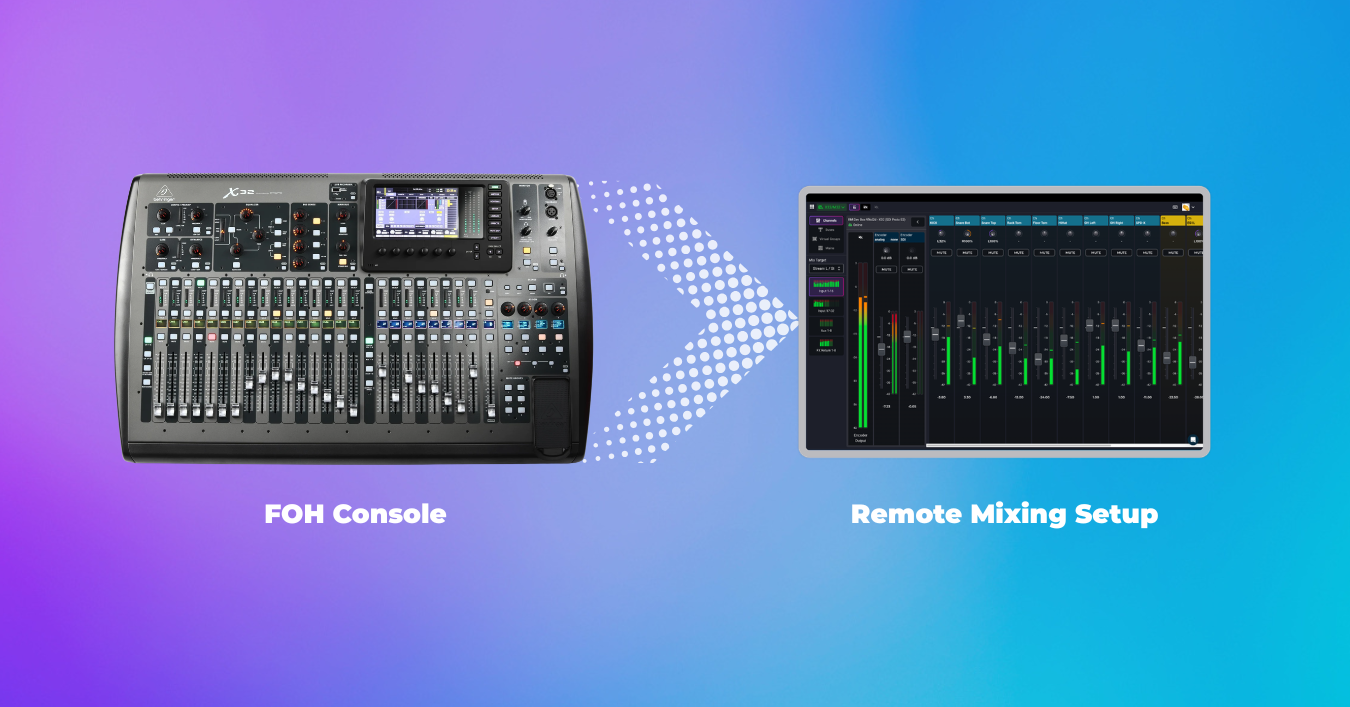
Certainly! And your end result can actually be better than a two-mixer setup if you approach it the right way.
For years, many have held the assumption that if you want a great live stream mix, you need a second mixer and a second person dedicated to it. One engineer can then handle the front of house mix while another can handle the broadcast mix.
This technically works. But it’s expensive, complex, and honestly, overkill for most organizations.
And to expand the question a bit, the only question shouldn’t just be if you can remote mix without a second physical mixer. It’s if you can do it in a way that actually improves your stream, without distracting your FOH engineer who’s fully focused on what things sound like in the room.
Step 1: It All Starts With a Digital Mixer
Step 2: Build a Dedicated Mix for Your Stream
Option 1: Traditional "Remote Mixing" Can Get You Most of the Way There
Option 2: The Ideal RemoteMix Setup That Works Best
What About Remote Desktop Tools for Remote Mixing?
Final Thoughts
Before you think about remote mixing, there’s a baseline requirement.
You need a digital mixer.
Not because it’s trendy, but because it’s the only way this works reliably.
Digital consoles from brands like Behringer, Allen & Heath, Yamaha, and PreSonus allow you to control mixes over a network or through a direct connection with your mixer. That’s really the foundation for everything else in this article, so it has to come first.
If you’re still running analog, there’s no clean path to remote control, unfortunately. Digital consoles give you that access, and from there we can start talking about remote mixing.
In the late 90’s my sisters and I would fight over who got to use the Gateway 2000 to hop on AOL Instant Messenger after school.
That’s kind of what sharing a single mixer between a front of house and stream audio engineer can feel like. So, instead of trying to “share” your main mixer by playing musical chars behind the same physical unit, a digital console lets you create a completely separate bus just for your live stream that you can access somewhere else.
Think of what your new reality could look like:
Your main mix serves the room, controlled by person A who mans your physical console.
Your stream bus serves the online audience, and can be overseen through digital control in the spot of their choice.
What’s great about this strategy is that you can change the stream mix without touching front of house.
That means not tapping the FOH engineer on the shoulder mid-service, “hey can you bring the vocals up for the stream?” And additionally, no need for either party to worry about potentially messing up the other’s mix.
So here you have it, you’ve effectively created a second mix… without a second mixer.
But how do you actually control the stream mix remotely? On to the next step.
At this point, you’ve got a few options.
Most digital mixers come with their own control apps. There’s also third-party tools like Mixing Station that expand compatibility and customization across different consoles.
These tools let you walk the room, step into a side room, or make adjustments without being physically behind the board.
That’s helpful. But it’s not true remote mixing.
Here’s the limitation:
You can control the mix remotely… but you can’t accurately hear the stream in real time.
If you’re in the room, you’re hearing the room.
If you step out and pull up the stream, you’re dealing with delay that could be several seconds or even up to a few minutes.
So you end up mixing based on guesswork, delayed feedback, or a hybrid of both.
That’s fine for small tweaks. It’s not how you dial in a great broadcast mix week after week, though.
If you want to remote mix optimally and from real range, you need two things working together:
This is where BoxCast RemoteMix comes into play.
Instead of just controlling your mixer, it gives you a live preview of what your audience is actually hearing and seeing.
Here’s how the setup typically works:
You connect your mixer once using either:
From there, you create a connection using a restricted shared mixer mode and assign your stream bus as the target.
That restriction means whoever is mixing remotely can only touch the stream mix. They can’t accidentally change anything that affects the room.
Now you’ve truly reached your goal with something game changing:
A remote operator who can log in from anywhere, hear the stream in near real time, and mix with intention instead of guesswork.
And here’s the benefit stated differently.
They’re not fighting the room.
They’re not dealing with audio bleed from the stage.
They’re not compensating for what the PA is doing.
They’re hearing exactly what your online audience hears, often from a quiet room with a good pair of headphones.
This isn’t just matching a second mixer setup, it’s taking it to the next level.
You might be thinking, couldn’t I just remote into a computer at the church and control everything that way?
Technically, yes.
Practically, it’s not a great experience, though.
Remote desktop setups introduce extra latency, unreliable audio routing, and a clunky control layer that wasn’t designed for live mixing and can consistently cause problems.
It may work in a pinch, though setup is clunky and it’s not something you’ll want to rely on every week.
So, do you need a second mixer to create a great live stream mix?
Definitely not.
What you actually need is:
Once those pieces are in place, you’re not just checking a box. You’re building a better workflow.
Your FOH engineer stays focused on the room.
Your stream gets the attention it deserves.
And you avoid spending thousands on extra hardware you don’t actually need.
In the end, remote mixing isn’t about doing more with less.
It’s about doing it smarter to give your online viewers the experience they deserve.