



|
BoxCast Streaming BoxCast Flow BoxCast Spark Broadcaster App BoxCast Producer Third-Party Encoders |

|
BoxCast RemoteMix Compatible Mixers Mixing Station Works with BoxCast RemoteMix |

|
BoxCast OTT Apps |
|
|
BoxCast Streaming BoxCast Flow BoxCast Spark Broadcaster App BoxCast Producer Third-Party Encoders |
|
|
BoxCast RemoteMix Compatible Mixers Mixing Station Works with BoxCast RemoteMix |
|
|
BoxCast OTT Apps |
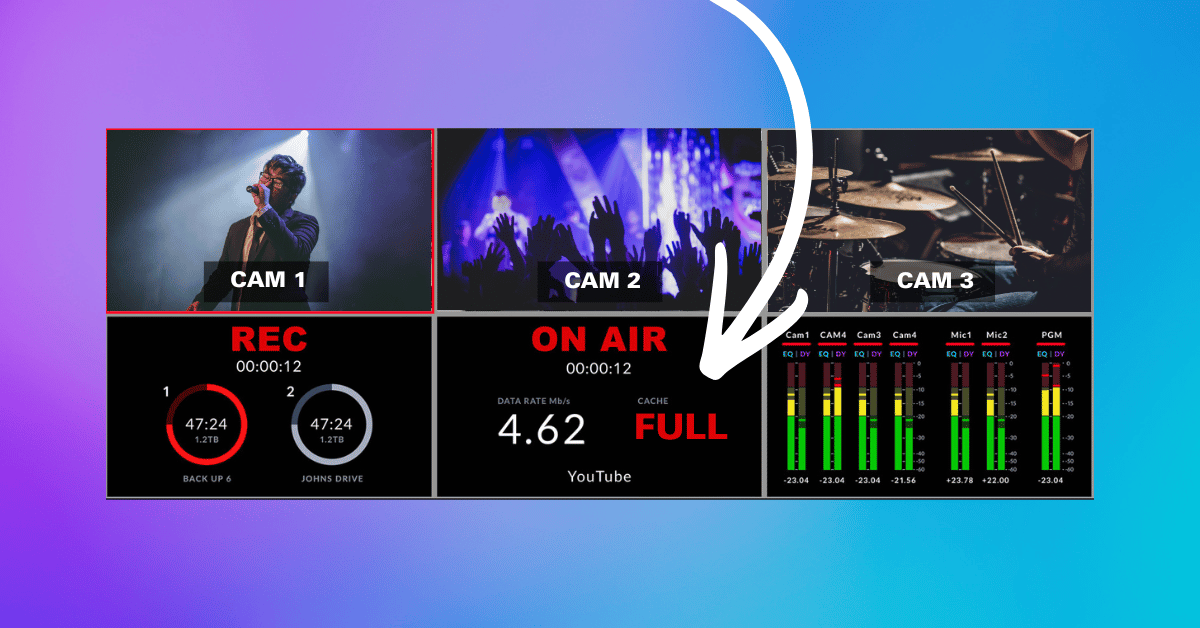
If you've ever seen the message "cache full," you've probably wondered what it actually means and whether it's something to worry about. The short answer is: it depends on what you're doing when it happens. Browsing the web with a full cache is a minor annoyance. A live broadcast with a full cache can mean a failed stream for engaged viewers, and this is especially common on switchers and encoders, even on some on the most widely used devices in production today. This guide walks through what cache is, why it fills up, and what to do about it.
What Is Cache?
What Does "Cache Full" Mean?
What Happens When a Cache Is Full?
Why Cache Matters for Live Streaming
How BoxCast Helps Prevent Streaming Problems
How to Fix Cache Full in Other Situations
Final Thoughts
To understand cache, it helps to start with how computers remember things.
Every device, whether it's your laptop, smartphone, streaming encoder, or gaming console, needs to remember information. Sometimes it needs to hold onto something for years. Other times, just a few seconds. That's where storage and memory come in.
Storage is where information is saved long term. It's permanent, even after the device powers off, but it's relatively slow compared to memory. Your SSD or hard drive is storage: that's where your operating system, photos, videos, and documents live.
Memory, or RAM (Random Access Memory), is much faster but temporary. It's where your device keeps the information it's actively working with right now. Power the device off, and that information disappears.
A simple analogy to understand the difference between the two comes when you observe a file cabinet and a desk. Your file cabinet stores everything you want to keep for a long time. Your desk, on the other hand, is where you place what you're actively working on, and maybe even your lunch. The bigger your desk, the more you can spread out before things get too cluttered to be functional.
Cache is a bit different. It's temporary storage that keeps frequently used data close at hand so it can be accessed faster. Depending on the application, that cache might live in RAM, on an SSD, or somewhere else. Its job is always the same: reduce the work a device has to do by remembering information it's likely to need again soon.
You probably use cache every day without realizing it:
Instead of downloading or processing the same information over and over, the cache stores it temporarily so your device can work more efficiently.
A cache only has so much space.
When that temporary storage fills up, the device or application may no longer have room for the additional information it needs. Depending on how the software was built, it might automatically clear out older cached data, slow down while it makes room, or throw an error like "cache full."
If you've landed here after seeing this exact message on one of your switchers or encoders, you're not alone. It's one of the most common ways broadcasters first encounter a full cache, and it happens for a specific, fixable reason we'll get into below.
The exact behavior varies by application, but the underlying problem is the same: the temporary workspace has hit its limit.
The effects depend on the device and the application.
Sometimes it's barely noticeable. Your browser just re-downloads an image, a mobile app takes an extra second to open, or a game reloads assets instead of pulling them from temporary storage.
Other times, the consequences are more serious. Applications handling large amounts of data, like video editing software, AI tools, or live streaming systems, can experience slower performance, buffering, dropped frames, failed processing, or even crashes if temporary resources get overwhelmed.
Live streaming is one of the most demanding workloads a computer or hardware streaming encoder can handle. Every second, the device processes video frames, audio files, encoded video, and network packets while continuously sending an ongoing stream of new data across the internet. To keep everything flowing, streaming systems sometimes temporarily hold portions of that data before transmitting it.
If the system can't process data fast enough, viewers see buffering, dropped frames, reduced quality, or interrupted streams.
A common real-world example in the industry comes when an ATEM switcher throws a "cache full" error mid-broadcast. This happens when the switcher generates video data faster than it can upload it to your streaming platform. The outbound connection can't keep pace with what the encoder is producing, so the switcher's cache fills up and the stream ultimately fails.
This is why a task like reliable streaming isn't just about having a fast internet connection. It also depends on hardware with enough processing power and memory, along with software designed to move data efficiently over the network.
At BoxCast, we’ve been helping organizations stream successfully since 2013, and we've done so by approaching the “cache full” challenge from two complementary directions simultaneously.
First, we build hardware equipped for demanding live production. For instance, our BoxCast Spark includes 4 GB of RAM, compared to what you might find in the popular Blackmagic Streaming Encoder 4K which only includes 512 MB.
RAM isn't cheap, and it would've been easier to cut hardware costs to increase profit margins by including less of it. Instead, we chose to give broadcasters more “desk space” to handle demanding workloads. Put differently, since our cache is nearly eight times larger than what you'll find in many comparable devices, broadcasters will experience far more headroom before they ever hit the “cache full” ceiling.
Secondly, we developed BoxCast Flow, our own proprietary streaming protocol. It combines Forward Error Correction, configurable latency, cloud transcoding, intelligent transport over hybrid UDP and TCP, and HEVC (H.265) compression to make streaming more resilient when network conditions change.
So if a connection quality drops, BoxCast can automatically adjust bitrate to match available bandwidth, which keeps the cache from filling up. Forward Error Correction adds another layer of protection, though how much it helps depends on the type of packet loss a stream is dealing with.
Together, our powerful hardware and advanced streaming protocol help reduce “cache full” interruptions and keep broadcasts running smoothly, even when internet conditions aren't perfect.
Not every "cache full" message requires new hardware or custom protocols to fix the problem.
In many less severe cases that aren’t time sensitive, clearing an application's cache is enough. It removes temporary files and lets the app rebuild fresh data. Restarting your device can also clear temporary memory and free up resources.
If the problem keeps coming back, it may be a sign your workload has outgrown your hardware. Adding more RAM, increasing available storage, or upgrading to a device built for demanding applications may be the better long-term fix.
The right answer depends on what you're doing, how painful the fallout of the error is, and how often you encounter it. Browsing the web requires very different resources than editing 4K video or broadcasting a live event.
Seeing a "cache full" message doesn't automatically mean something is broken. Sometimes the fix is as simple as clearing temporary files or restarting your device. Other times, especially during demanding workloads like live streaming, it's a sign your hardware or software isn't built for the task at hand.
Understanding how cache works can help you troubleshoot faster, choose the right equipment, and avoid interruptions when reliability matters most. If live streaming is mission-critical for your organization, hardware with ample memory and a streaming platform built for real-world network conditions can make all the difference.
See how BoxCast's hardware and streaming protocol are built to keep your broadcasts running, even when conditions aren't perfect.


